
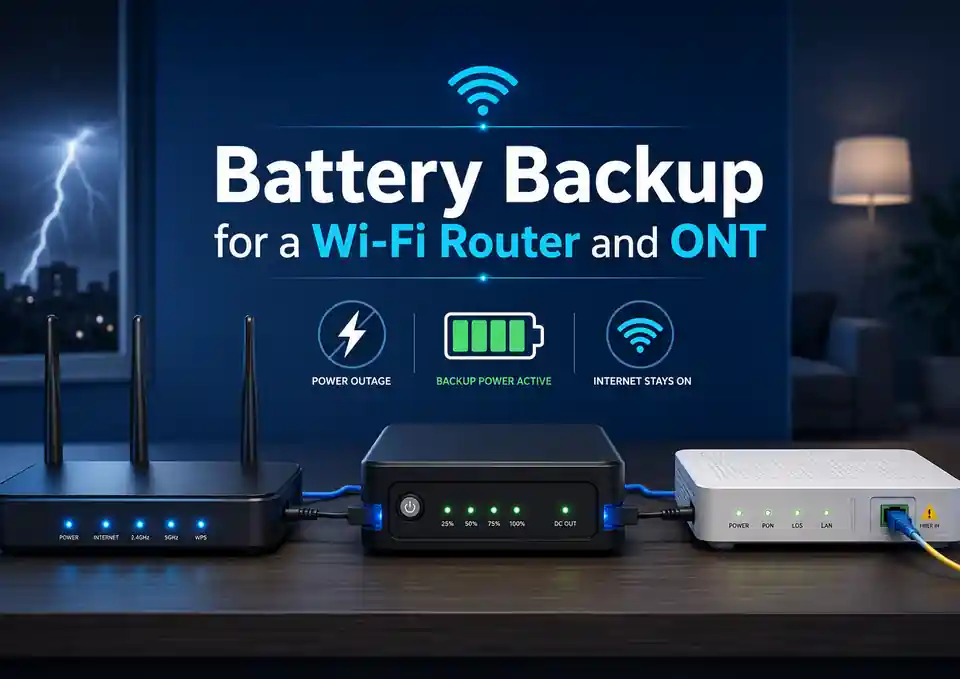
A home internet connection can stop during a power cut even when the fibre line itself is still working. The usual reason is simple: the Wi-Fi router, the optical network terminal (ONT), or both have lost power. A small battery backup can keep these devices online for several hours, but only when it supplies every essential device at the correct voltage and has enough usable energy for the required runtime.
Quick answer: many router-and-ONT setups draw roughly 10–30W in total, although individual devices can fall outside that range. A backup with 100Wh of usable output energy would run a 20W setup for about five hours. Check the actual device labels, output voltage, connector polarity and usable battery energy before buying.
What this guide covers
Start with the complete internet power chain
Before choosing a mini UPS, standard UPS or power station, identify every powered device between the incoming service and your phone or laptop. Backing up only the visible Wi-Fi router may not be enough.
Devices that may need backup power
| Device | What it does | Does it usually need backup? |
|---|---|---|
| Optical network terminal (ONT) | Converts the incoming fibre signal into Ethernet, telephone or other services | Yes, unless it is integrated into the router or already has its own battery |
| Wi-Fi router or gateway | Creates the local network, assigns addresses and provides Wi-Fi | Yes |
| Separate modem | Connects cable, DSL or another access technology to the router | Yes, when present |
| Mesh Wi-Fi node | Extends wireless coverage to another part of the home | Only if coverage from the main router is not sufficient during an outage |
| Network switch or PoE injector | Connects additional wired devices or supplies power over Ethernet | Only if a required device depends on it |
| ISP voice adapter or alarm interface | Provides telephone or other provider services | Yes, if that service must remain available |
A powered router does not guarantee an internet connection. If a separate ONT or modem remains unplugged, the router may continue broadcasting Wi-Fi while showing no internet access.
Wi-Fi can stay visible even when the internet is down
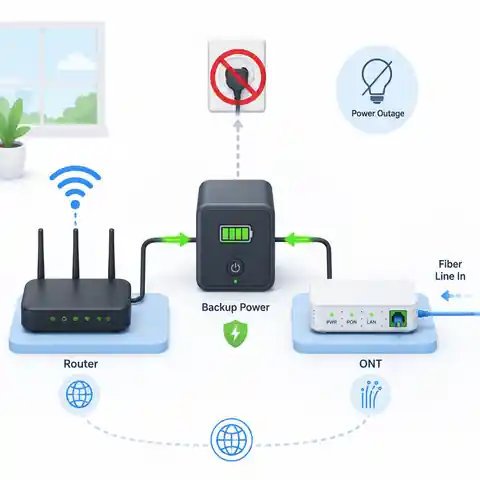
The router creates your local Wi-Fi network, so phones and laptops may still connect to it during an outage.
The ONT is the separate box that converts the optical signal from the provider. If it loses power, the router has no working internet connection to share.
Treat the router and ONT as one small backup system unless your gateway already combines both functions in a single device.
Read the power labels before choosing a backup
Look at the original power adapter and the label on each device. Record the output voltage, current rating, polarity symbol and connector type. A typical label may read 12V DC, 1A, centre-positive, but another device in the same home may require 9V, 5V or a different plug.
What each label value means
| Label detail | Why it matters | What to check |
|---|---|---|
| Voltage (V) | The backup output must supply the voltage expected by the device | Match the stated DC voltage unless the manufacturer gives an approved range |
| Current (A) | Shows the maximum current the original adapter is designed to provide | The backup output should meet or exceed the device requirement |
| Polarity | Shows whether the centre pin is positive or negative | Match it exactly; reversed polarity can damage equipment |
| Connector size | Barrel connectors that look similar may have different inner diameters | Confirm the plug fits correctly without forcing it |
| AC input | Shows what mains supply the original adapter accepts | Relevant when using a standard AC UPS or power station |
The adapter rating is not always the device's continuous power consumption. For example, a 12V 1A adapter can provide up to 12W, but the router may use less during normal operation. Use the label as a safe starting point for output compatibility, then measure actual power when you need a more accurate runtime estimate.
A router uses a 12V 1A adapter. Should you calculate it as a constant 12W load?
Answer: Use 12W as a conservative first estimate, but do not assume it is the exact continuous draw.
Explanation: The adapter's 1A rating describes how much current it can supply, not necessarily what the router draws at every moment. A plug-in power meter or a suitable DC power meter can provide a better measurement. Leave some margin for changing Wi-Fi activity, USB devices and future equipment.
Do not connect a bare battery directly to a router or ONT unless the equipment manufacturer explicitly permits the battery's full voltage range and the system includes suitable regulation and protection. A nominal 12V battery does not remain at exactly 12V while charging and discharging.
Choose the right type of backup power
There is no single best backup for every network. The practical choice depends on whether your devices use the same DC voltage, how long they must run and whether you need automatic switchover without restarting the connection.
Router and ONT backup options compared
| Backup option | Advantages | Limitations | Best suited to |
|---|---|---|---|
| DC mini UPS | Compact, usually efficient at small loads, may switch automatically, often has several DC outputs | Voltage, polarity, plugs and total current must all match; advertised capacity may be unclear | A router and ONT with compatible low-voltage DC inputs |
| Standard AC UPS | Keeps the original adapters, works with mixed voltages, simple to connect | Can be bulky and inefficient at a very small load; inverter self-consumption may shorten runtime | Mixed equipment or users who want the simplest plug-in arrangement |
| Portable power station | More energy, several output types, can also charge phones or laptops | Some models do not provide seamless UPS operation; AC output adds conversion losses | Longer outages or several essential devices |
| Battery with inverter or DC converters | Flexible capacity and long runtime when properly designed | Requires correct protection, charging, wiring and installation; often excessive for a small network load | A wider home backup system designed by a competent person |
| USB power bank with voltage converter | Small and widely available | Pass-through charging, automatic restart, output stability and converter quality vary greatly | Temporary or supervised use only when full compatibility has been verified |
When a DC mini UPS makes the most sense
A DC mini UPS is often the most efficient choice for a small router-and-ONT load because it avoids converting battery power to mains AC and then back to low-voltage DC through two separate adapters. It is especially convenient when both devices use the same voltage and the UPS has two properly rated outputs.
- Confirm each output voltage independently; a multi-output unit may provide 5V, 9V, 12V, 15V or 24V on different sockets.
- Add the current requirements of all devices sharing one output. The total must remain within the UPS output rating.
- Check whether the unit continues powering the load while it is charging.
- Check whether transfer to battery causes the router or ONT to restart.
- Confirm that the supplied cables and plugs match securely rather than relying on a loose adapter tip.
- Look for a clear watt-hour rating, cell specification or manufacturer runtime table instead of relying only on a large mAh number.
When an AC UPS is the easier choice
A standard AC UPS is easier when the router and ONT use different voltages or unusual connectors. You plug their original adapters into the battery-backed outlets, which removes most low-voltage connector uncertainty. The trade-off is that a small 10–30W network load may be an inefficient operating point for a large UPS, so the runtime should come from the manufacturer's curve or a real test rather than a simple battery label.
UPS power rating and UPS runtime are different questions. A 600W UPS can easily support a 20W network load, but its battery size, inverter overhead, battery age and low-load behaviour determine how long it will run.
How to calculate router and ONT runtime
The simplest useful calculation divides usable output energy by the total average load. Use watt-hours for the battery and watts for the connected equipment.
Estimated runtime in hours = usable output energy in Wh ÷ total average load in W
If the battery specification gives nominal energy rather than usable output energy, reduce it for the usable battery fraction, conversion losses and any reserve you want to keep. For a standard UPS, the manufacturer's runtime chart is often more reliable because it already reflects the UPS battery, inverter and cut-off behaviour.
How long will 100Wh of usable backup energy run a 20W router-and-ONT setup?
Answer: About 5 hours as a simple planning estimate.
Explanation: 100Wh ÷ 20W = 5 hours. Actual runtime may be shorter if the quoted 100Wh is nominal battery energy rather than usable output energy, or if the backup unit has significant standby consumption.
How much usable energy is needed for an 8-hour outage at a 15W average load?
Answer: At least 120Wh at the output, before adding a planning reserve.
Explanation: 15W × 8h = 120Wh. Adding a 20% reserve raises the target to about 144Wh of usable output energy. The product's nominal battery capacity may need to be higher after conversion losses and discharge limits are included.
Ideal runtime from stated usable output energy
| Usable output energy | 10W load | 15W load | 20W load | 30W load |
|---|---|---|---|---|
| 40Wh | 4.0 h | 2.7 h | 2.0 h | 1.3 h |
| 80Wh | 8.0 h | 5.3 h | 4.0 h | 2.7 h |
| 120Wh | 12.0 h | 8.0 h | 6.0 h | 4.0 h |
| 200Wh | 20.0 h | 13.3 h | 10.0 h | 6.7 h |
This table uses energy that is already available at the output. If a product advertises only its internal cell capacity, the final usable energy will be lower after voltage conversion, battery protection and other losses.
Why a 10,000mAh label can be misleading
Small battery products are often advertised in milliamp-hours without making the voltage equally prominent. Milliamp-hours cannot be compared fairly unless the voltage is also known. A 10,000mAh internal battery rated at 3.7V stores about 37Wh, not 120Wh at a 12V output.
What could a 10,000mAh, 3.7V battery provide to a 15W network load?
Answer: Roughly two hours may be a reasonable first estimate, not the eight hours suggested by dividing 10Ah by a 1.25A load at 12V.
Explanation: Internal energy is about 10Ah × 3.7V = 37Wh. If around 85% reaches the 12V output, usable energy is about 31Wh. Then 31Wh ÷ 15W = about 2.1 hours. Product design, cut-off settings and battery condition can change the result.
Four common home network configurations
1. Separate 12V router and 12V ONT
This is the easiest arrangement for a dual-output 12V DC UPS, provided both devices are centre-positive, the plugs fit and the combined current remains below the output limit. Do not assume the same voltage means the same connector size.
2. Router and ONT use different voltages
Use a backup with independently labelled outputs or retain the original adapters with an AC UPS. Never feed a 9V device from a fixed 12V output merely because the plug fits. Also check that changing a selector switch cannot happen accidentally after installation.
3. Integrated ONT and Wi-Fi gateway
Only one device may need power, which simplifies the setup. Integrated gateways can consume more than a basic standalone ONT, so use the gateway's own label or measured power rather than a generic ONT estimate.
4. Router, ONT, mesh nodes and PoE equipment
List only the devices that are genuinely required during an outage. The main router and ONT may be enough for a small home, while powering several mesh nodes, a switch and PoE cameras can multiply the load. A larger standard UPS or power station may then be more appropriate than a small dual-output mini UPS.
Measure the real load when runtime matters
The best estimate comes from measurement under normal use. Connect the original adapters to a plug-in energy meter, allow the router and ONT to finish starting, and observe the combined wattage during ordinary internet activity. For a DC backup, a suitable inline DC meter can measure voltage, current and energy directly, but only use test equipment that is correctly rated and connected.
- Measure the router and ONT together because both must remain active.
- Allow several minutes for startup, firmware checks and Wi-Fi radios to settle.
- Check the load during video calls, streaming, file transfers and normal idle periods.
- Include any mesh node, switch, PoE injector or voice adapter that will stay on.
- Use the average value for the runtime calculation and retain a reasonable reserve.
- Repeat the measurement after adding USB storage, mobile broadband or other router accessories.
For an AC UPS, compare your measured load with the manufacturer's runtime curve at a similar wattage. Do not estimate runtime by dividing the UPS watt rating by the connected load; the watt rating describes output capability, not stored energy.
Check whether the provider's network also has backup power
Keeping your own equipment powered does not guarantee that the wider network will remain online. Fibre systems often depend on active equipment elsewhere in the provider's network, and cable or wireless services may depend on powered cabinets, base stations or local nodes. Ask the provider whether service normally continues during a local outage and whether any telephone service has separate backup requirements.
This check matters most when you are buying a large battery solely for internet access. A ten-hour home backup provides little benefit if the provider's local equipment usually stops after one hour.
Test the system before you depend on it
A backup is not ready simply because the lights turn on. Test it in a controlled way while mains power is available and the equipment can be reconnected normally if anything behaves unexpectedly.
- Fully charge the backup according to the manufacturer's instructions.
- Connect the ONT, router and any other essential network device.
- Confirm that every output voltage and cable is correct before switching on.
- Disconnect the backup unit from the wall outlet; do not open electrical panels or alter fixed wiring.
- Check whether the ONT and router remain powered without rebooting.
- Open several websites or run a video call to confirm that the connection is genuinely online.
- Let the system operate for at least 30–60 minutes and check plugs, cables and the battery unit for unusual heat, smell or instability.
- For a full runtime test, use non-critical conditions and stop if the manufacturer advises against deep discharge.
Do not place a battery backup on soft furnishings, cover its ventilation openings or use damaged and swollen battery products. Stop using equipment that becomes unusually hot, smells abnormal, makes unexpected noises or has damaged cables or connectors.
Common mistakes that shorten runtime or damage equipment
Mistake, consequence and better approach
| Mistake | What can happen | Better approach |
|---|---|---|
| Backing up only the router | Wi-Fi remains visible but the ONT or modem is offline | Trace the complete network power chain |
| Matching the plug but not the voltage | The device may fail to start or may be damaged | Match voltage, polarity and connector size |
| Using one splitter for devices with different voltages | One or both devices receive the wrong supply | Use independently regulated outputs or the original adapters |
| Adding adapter current ratings and treating the result as actual load | Runtime may be underestimated or the backup may be oversized | Measure actual watts while retaining output-current margin |
| Believing a large mAh number without checking voltage | Available watt-hours may be far lower than expected | Compare battery products in Wh |
| Choosing a large AC UPS only from its watt rating | It supports the load but may still provide disappointing runtime | Check runtime at the actual low load |
| Ignoring battery ageing | A system that once lasted four hours may shut down much sooner | Retest periodically and replace the battery as recommended |
| Never testing automatic switchover | The router or ONT reboots during the first real outage | Perform a controlled unplug test |
A practical buying checklist
- List every device required to keep the connection working.
- Record voltage, current, polarity and connector size for each device.
- Measure or conservatively estimate the combined wattage.
- Choose the number of backup hours you actually need.
- Calculate required usable watt-hours and add a reserve.
- Check whether the product's energy rating is nominal battery energy or usable output energy.
- Confirm uninterrupted or sufficiently fast transfer to battery power.
- Check charging time after a long outage.
- Confirm the battery can be replaced when relevant, especially in a conventional UPS.
- Read the temperature, ventilation, storage and battery-care instructions.
- Ask the internet provider whether its network remains active during local outages.
- Run a real test before relying on the system for work, communication or emergency information.
For most homes, the best result is not the largest backup unit. It is the smallest well-matched system that powers the complete connection, switches over reliably and provides the required runtime with a sensible reserve.
Related backup power guides
How Long Will a 100Ah Battery Last? Runtime Formula, Examples and CalculatorWhat Size Battery Backup Do I Need? Home Sizing GuideFrequently asked questions
Can one mini UPS power both a router and an ONT?
Yes, when the UPS provides the correct voltage for each device, the polarity and plugs match, and the combined current remains within the output rating. If the devices use different voltages, use separate regulated outputs rather than a simple splitter.
How many watts do a Wi-Fi router and ONT use?
A combined planning range of roughly 10–30W is common for basic home equipment, but high-performance gateways, mesh units, USB accessories and PoE devices can use more. Read the labels and measure the actual combined load for a reliable answer.
Will a regular computer UPS work for internet equipment?
Usually yes. The original router and ONT adapters can be connected to battery-backed UPS outlets. However, low-load runtime varies widely between UPS models, so check the manufacturer's runtime information and test the system rather than judging it only by the VA or watt rating.
Why does the router restart when the power fails?
The backup may have a transfer interruption that is too long for the router, the battery may be weak, the output voltage may dip, or the connected load may exceed the unit's capacity. Test the ONT and router together and check the backup specifications for transfer behaviour and output limits.
Can a power bank run a 12V router?
It can when a compatible regulated converter supplies the required 12V output, current, polarity and connector. Many ordinary power banks do not support reliable pass-through operation or automatic restart, so they should not be assumed to work as an unattended UPS without testing.
Does the internet always work if the ONT and router have power?
No. Your provider's upstream equipment must also remain powered and operational. Ask the provider about outage resilience in your area, particularly when internet access is important for remote work, security systems or emergency communication.
The reliable approach
A reliable router and ONT backup starts with the devices, not the battery advertisement. Identify the complete connection, match every electrical requirement, calculate from watt-hours and actual watts, and then perform a controlled test. For a small compatible DC setup, a mini UPS can be compact and efficient. For mixed voltages or unusual plugs, a standard AC UPS may be easier and safer to configure.
Keep enough reserve for battery ageing, colder conditions and longer-than-expected outages. Where the system involves exposed batteries, permanent wiring, custom converters or higher-power equipment, have the design checked by a suitably qualified person and follow local electrical rules and the equipment manufacturers' instructions.