
In this troubleshooting guide
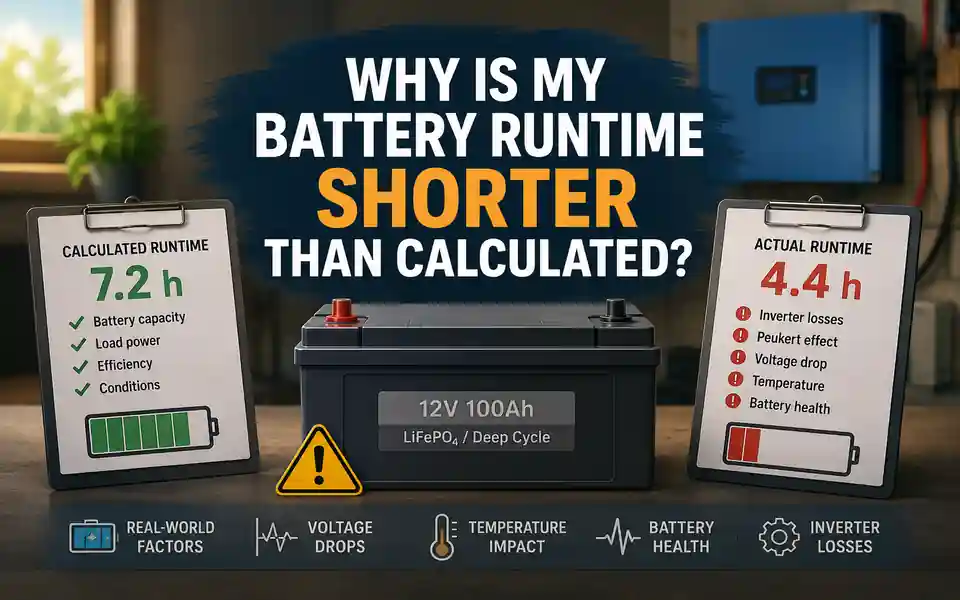
Do not bypass a battery management system, low-voltage cut-off, fuse, breaker or temperature protection to gain extra runtime. These protections may be stopping discharge because the battery, cables or inverter have reached an unsafe or unsupported condition. High-current and permanently installed systems should be checked by a qualified specialist.
Start With the Size and Pattern of the Runtime Gap
Before changing settings or buying a new battery, record what actually happened. The pattern of the shortfall often gives a better clue than the final number alone.
What the runtime pattern may suggest
| What you observe | Possible explanation | First check |
|---|---|---|
| Runtime is only slightly shorter than expected | Normal efficiency variation, inverter self-consumption or a modest difference in average load | Measure the real load and include system overhead |
| Runtime is much shorter every time | Overestimated usable capacity, aged battery, incomplete charging or consistently higher load | Confirm starting state of charge and repeat the test with a measured load |
| The inverter stops suddenly under a heavy load | Voltage sag, BMS current limit, inverter cut-off or cable voltage drop | Observe battery-side voltage and current during the load |
| Runtime changes greatly from one day to another | Different appliance use, cycling loads, temperature or inconsistent charging | Repeat the test under the same conditions |
| The system lasts well at low power but poorly at high power | Lead-acid discharge-rate effect, voltage sag, cable loss or battery current limit | Compare low-load and high-load tests |
| The battery monitor says energy remains, but the inverter shuts down | Monitor calibration, low-voltage cut-off, cell imbalance or BMS protection | Check alarms, event history and voltage at shutdown |
Use the same load, starting charge and temperature when comparing tests. A test where a refrigerator cycles, a laptop charges and someone occasionally uses another appliance is useful for real life, but it is not a controlled comparison.
Recalculate with the Battery Runtime CalculatorThe Calculation Used Nominal Capacity Instead of Usable Capacity
The number printed on a battery or power station is normally its rated or nominal capacity. It is not always the amount of energy that will reach the appliance. Some capacity may remain unused because of the selected depth of discharge, the battery management system, inverter cut-off settings or the need to protect battery life.
For example, a 12 V 100 Ah battery represents about 1,200 Wh of nominal energy. A calculation that divides 1,200 Wh directly by a 100 W load predicts 12 hours. That result ignores the usable discharge limit, inverter losses and the inverter’s own power consumption. The practical figure may be much lower.
The label is the starting point, not the final runtime
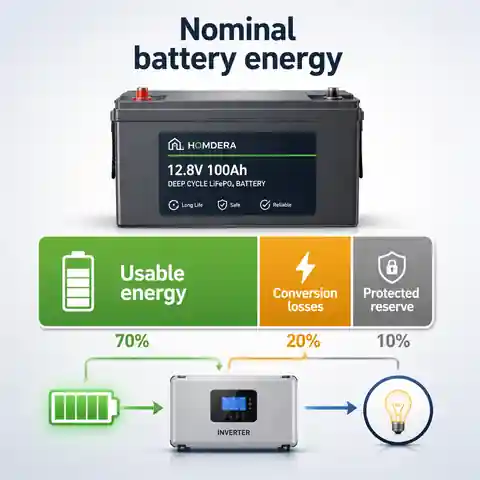
Nominal capacity describes the battery under specified test conditions. It does not automatically include the discharge limit used by your system.
Energy is then lost in the inverter, DC converter, cables and control electronics before it reaches the appliance.
A realistic estimate should therefore begin with rated energy and then account for usable capacity and system losses separately.
Do not apply one universal usable-capacity percentage to every battery. Lead-acid, AGM, gel, LiFePO4 and integrated power stations can have different limits, and the permitted discharge may also depend on the product settings and desired service life.
The Battery Did Not Start the Test Fully Charged
A battery can appear charged without having completed the full charging process. A charger may have stopped early, a solar system may have had insufficient time or sunlight, or an inverter-charger may have been configured for the wrong battery type. With lead-acid batteries, reaching a high voltage briefly does not necessarily mean the absorption stage has finished. With lithium batteries, a state-of-charge display can also drift if the monitor has not been synchronised correctly.
- Confirm that the charger profile matches the battery chemistry and system voltage.
- Check whether the charger completed its normal charging stages rather than stopping after a short voltage rise.
- Allow the battery to rest where the manufacturer’s procedure requires it before judging open-circuit voltage.
- Review the battery monitor or app for the starting state of charge, charging history and any active limits.
- For a battery bank, check whether all batteries or cells reached a balanced state.
- Repeat the runtime test only after a confirmed full charge.
A useful controlled test begins with a documented full charge, a known load and a recorded start time. “It had been charging for a while” is not quite the same measurement.
The Real Load Is Higher Than the Number in the Calculation
The appliance figure used in a calculation may be a label value, a generic estimate or a reading taken in only one operating mode. Real demand can be higher because several devices run together, chargers change their consumption, pumps and fans switch on, or an appliance uses heaters, defrost cycles and control electronics that were not included.
- Measure AC appliances with a suitable plug-in energy meter where possible.
- For cycling equipment, record watt-hours over several hours rather than relying on one instant watt reading.
- Include routers, network terminals, monitors, pumps, fans and standby devices that remain connected.
- Check whether an appliance entered a high-power mode during the test.
- Separate startup surge from average running demand: surge affects whether the system starts, while average demand affects runtime.
- Measure the complete group of devices that will operate together, not each one on a different day.
A refrigerator is a good example. Its compressor does not run continuously, but the average consumption can change with room temperature, door opening, food temperature, thermostat setting, defrost operation and ventilation around the appliance. A short measurement taken while the compressor is off is especially misleading.
For cycling loads, energy measured over time is usually more useful than one power reading. If a device uses 600 Wh over six hours, its average load during that period is 100 W—even if the live display moves between almost zero and several hundred watts.
The Inverter and Control Equipment Use Power Too
An inverter consumes energy while converting DC battery power into AC power, and it may continue to draw power even when the connected appliance is off. Displays, communication modules, relays, cooling fans and battery monitoring equipment can add further overhead.
Why can a 10 W inverter overhead matter so much with a small load?
Answer: A 40 W appliance plus 10 W of system overhead creates a 50 W demand before other losses are considered. The overhead increases total demand by 25%, so runtime can be about one-fifth shorter than a calculation based on the 40 W appliance alone.
Explanation: The same 10 W overhead is less noticeable beside a 500 W load, but it can dominate a small router, network terminal or standby setup that runs for many hours.
Search or eco modes can reduce no-load consumption, but they are not suitable for every appliance. Some low-power devices may not be detected reliably, and pumps, refrigerators or electronic controls may behave unpredictably if the inverter repeatedly wakes and sleeps. Follow the inverter manufacturer’s instructions when using these modes.
See the full battery runtime formula, including inverter self-consumption and worked examples.Inverter Efficiency Is Not One Fixed Percentage
The highest efficiency shown in a product specification may occur only within a particular load range. Efficiency can be lower at very light loads, close to maximum output, during high temperatures or when the inverter’s cooling system is active. A large inverter running a very small appliance can therefore use a greater share of the battery energy than a simple headline efficiency suggests.
For a more realistic estimate, use an efficiency value from the manufacturer’s curve near the expected load. When no curve is available, use a cautious planning assumption and compare it with a measured full-system test rather than assuming 100% conversion.
Lead-Acid Capacity Falls More at High Discharge Rates
Many lead-acid battery ratings are stated at a relatively slow discharge rate, such as a 20-hour rate. When the same battery is discharged much faster, its effective capacity can be lower. This is commonly described by the Peukert effect. It is one reason a lead-acid battery may perform reasonably with small electronics but provide disappointing runtime with a large inverter load.
Lithium batteries are generally less affected by this particular capacity loss, but they still have maximum continuous current, peak current, temperature and BMS limits. A battery can contain enough energy in theory yet still switch off because the demanded current exceeds a permitted limit.
Why the same battery behaves differently at low and high loads
| Condition | Low-load test | High-load test |
|---|---|---|
| Battery current | Relatively low | Much higher |
| Lead-acid effective capacity | Closer to the rated slow-discharge capacity | May be noticeably reduced |
| Voltage sag | Usually smaller | Usually greater |
| Cable loss | Lower because current is lower | Can become significant |
| BMS or inverter current limit | Less likely to be reached | May stop the system |
| Inverter heat | Usually modest | May increase losses or trigger derating |
Voltage Sag Can Make the Inverter Stop Before the Battery Looks Empty
Battery voltage normally drops when current increases. A worn, cold, undersized or partly discharged battery may show a much larger drop under load. If the voltage at the inverter falls below its low-voltage threshold, the inverter can shut down even though the battery voltage rises again after the load is removed.
The battery can recover after the inverter switches off
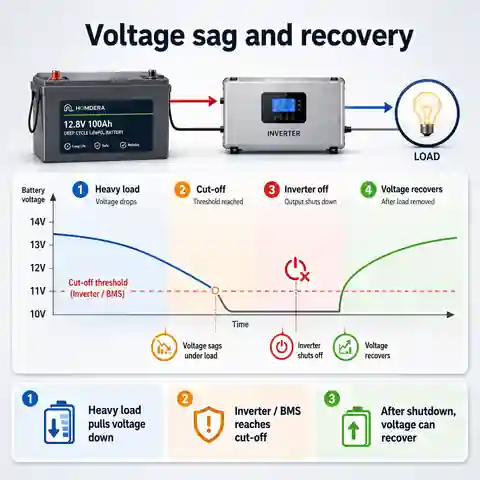
Under a heavy load, battery voltage may fall below the inverter or BMS cut-off threshold.
Once the inverter stops, current drops and the battery voltage can recover, making the battery appear less discharged than expected.
This recovery does not prove that the protection operated incorrectly. The important value is the voltage while the load is present.
- Record battery voltage before the load starts.
- Record voltage at the battery terminals while the load is running.
- Record voltage at the inverter DC input at the same time.
- Note the lowest voltage immediately before shutdown.
- Check the inverter alarm, low-voltage setting and restart threshold.
- For a lithium battery, check whether the BMS reported cell undervoltage, overcurrent or temperature protection.
Do not simply lower the inverter cut-off setting to force more runtime. The correct setting depends on battery chemistry, load, cable drop, BMS behaviour and manufacturer requirements. An unsuitable setting can over-discharge the battery or hide a wiring problem.
Cable and Connection Losses Can Imitate a Weak Battery
On the battery side of an inverter, current can be very high. Long or undersized cables, loose terminals, corrosion, damaged lugs and poor isolation connections can create voltage drop and heat. The battery may still have energy available, but the inverter sees a lower voltage and shuts down early.
- Compare voltage directly at the battery with voltage at the inverter input under load.
- Inspect cables, lugs, fuse holders, disconnects and busbars for damage, corrosion or discolouration.
- Check whether cables are correctly sized for current, length, installation method and temperature.
- Confirm that positive and negative cable paths are both included when assessing the circuit.
- For parallel batteries, check that cable arrangement does not make one battery carry more current than the others.
- Use appropriate overcurrent protection close to the battery as required by the equipment instructions and local rules.
Hot terminals, softened insulation, a burning smell, sparking or visible damage require immediate attention. Disconnect the system only if it is safe to do so and have it inspected. Do not work on exposed high-current battery connections without appropriate competence and protection.
Temperature Changes Available Capacity and Protection Behaviour
Battery specifications are commonly measured under controlled conditions around normal room temperature. Cold conditions can reduce available capacity and increase voltage sag. Very high temperatures may trigger battery or inverter protection, reduce inverter output or accelerate battery ageing. The exact effect depends on battery chemistry and product design.
Use both Celsius and Fahrenheit when comparing specifications: 0°C is 32°F, 20°C is 68°F and 25°C is 77°F. Check the permitted charging and discharging ranges separately, especially for lithium batteries. A battery may be allowed to discharge at a temperature where charging is restricted or disabled.
Do not use a generic cold-weather percentage as if it applies to every battery. Consult the battery data sheet for capacity, current and charging limits at the temperature where the system will actually operate.
Age, Cell Imbalance and Battery Condition Reduce the Real Capacity
Battery capacity declines with age, cycle use, prolonged storage at an unsuitable state of charge, repeated deep discharge, incorrect charging and high temperature. In a multi-battery bank, one weak battery or cell can reach a protection limit before the rest of the bank is empty.
Battery-condition clues
| Clue | What it may mean | Useful next step |
|---|---|---|
| Runtime has gradually fallen over months | Normal ageing, increasing load or charging deterioration | Compare a controlled test with an older recorded test |
| One battery has a different resting voltage | Imbalance, connection problem or weaker battery | Check the bank using the manufacturer’s procedure |
| One battery or cell reaches low voltage first | Capacity or balance mismatch | Review BMS data and have the bank assessed |
| The state-of-charge display jumps suddenly | Monitor calibration issue, voltage sag or protection event | Synchronise the monitor correctly and inspect event logs |
| The battery becomes unusually hot, swollen or emits an odour | Potential internal failure or unsafe condition | Stop using the system and obtain professional advice |
| Runtime is poor immediately after a full charge | Reduced capacity, high internal resistance or incorrect charge profile | Perform an appropriate capacity test or professional assessment |
A proper capacity test should follow the battery manufacturer’s method and use an appropriate discharge rate and end voltage. A quick test with a random appliance can reveal a problem, but it may not produce a capacity figure that can be compared directly with the battery specification.
Cycling Appliances Make Short Tests Misleading
Refrigerators, freezers, pumps, heating systems, air conditioners and dehumidifiers do not necessarily use constant power. Their average demand changes with duty cycle. A one-hour test may happen during an unusually quiet or unusually active period, while a longer outage includes different operating stages.
- Measure energy use over a representative period, not only a few minutes.
- Include thermostat cycles, defrost heaters, circulation pumps and control equipment.
- Repeat the measurement in conditions similar to the expected outage.
- For a refrigerator or freezer, avoid using a test immediately after loading warm food unless that is the scenario you need to plan for.
- For heating systems, include every pump, fan, valve and control that receives power from the backup source.
Worked Example: How a 7.2-Hour Estimate Became About 4.4 Hours
Consider a 12 V 100 Ah battery expected to run a 120 W AC load. The original estimate assumed 80% usable capacity and 90% inverter efficiency.
What did the original calculation predict?
Answer: 12 V × 100 Ah × 0.80 × 0.90 ÷ 120 W = 7.2 hours.
Explanation: This is a reasonable planning estimate if the battery begins fully charged, still provides its rated capacity, the average load is really 120 W and the inverter performs at 90% efficiency without additional overhead.
During the real test, the battery began at about 90% state of charge, its present capacity was estimated at 85% of the original rating, the average appliance load measured 135 W, inverter efficiency at that load was closer to 87%, and the inverter plus monitoring equipment used another 10 W.
Revised runtime using measured conditions
| Adjustment | Calculation or effect | Approximate result |
|---|---|---|
| Nominal battery energy | 12 V × 100 Ah | 1,200 Wh |
| Battery started at 90% | 1,200 × 0.90 | 1,080 Wh |
| Present capacity is about 85% of rating | 1,080 × 0.85 | 918 Wh |
| Planned usable portion is 80% | 918 × 0.80 | 734 Wh of usable DC energy |
| Battery demand from the 135 W AC load | 135 ÷ 0.87 | About 155 W |
| Add inverter and monitoring overhead | 155 + 10 | About 165 W total DC demand |
| Revised runtime | 734 ÷ 165 | About 4.4 hours |
No single assumption caused the whole difference. The shorter runtime came from several ordinary factors acting together. This is common: a slightly incomplete charge, some capacity loss, a higher measured load and modest inverter overhead can turn a comfortable-looking estimate into a much shorter operating period.
A Safe Troubleshooting Order
The order matters. Start with information that can be collected without opening equipment or changing protective settings.
- Write down the calculated runtime, actual runtime and exact test conditions.
- Confirm battery voltage, capacity and chemistry from the label or data sheet.
- Confirm that the battery started from a properly completed charge.
- Measure the real appliance energy use over a representative period.
- Include inverter idle draw, displays, communication modules and other permanent loads.
- Use a realistic inverter efficiency near the actual load level.
- Review battery and inverter alarms, cut-off events and BMS history.
- Compare voltage at the battery and inverter while the load is running.
- Repeat the test at a lower load and compare the result.
- If the shortfall remains large, arrange an appropriate battery-capacity and system assessment.
Keep a simple test log: date, temperature, starting state of charge, load in watts, energy used in watt-hours, lowest battery voltage, shutdown reason and final runtime. Two comparable tests are more useful than ten impressions.
What Not to Do When Runtime Is Short
- Do not bypass the BMS, fuse, breaker or low-voltage protection.
- Do not lower cut-off voltage without checking battery and inverter requirements.
- Do not assume a battery is defective because voltage recovers after shutdown.
- Do not judge capacity from open-circuit voltage alone while ignoring voltage under load.
- Do not mix batteries of different chemistry, voltage, capacity, age or condition to recover runtime.
- Do not increase fuse or breaker ratings to stop protective devices operating.
- Do not use thinner or improvised cables because the test is temporary.
- Do not continue using a battery that is swollen, leaking, unusually hot, damaged or producing an abnormal smell.
- Do not rely on a single best-case test for medical, heating, flood protection or other critical equipment.
When a Qualified Specialist Should Check the System
Basic monitoring and recalculation can identify many planning errors. Professional assessment is appropriate when the issue involves high current, permanent wiring, repeated protection events or signs of damage.
- Cables, terminals, fuses or disconnects become hot.
- The inverter or BMS repeatedly shuts down under a load that should be supported.
- There is visible corrosion, damaged insulation, swelling, leakage or an unusual smell.
- A multi-battery bank shows persistent imbalance.
- The system supplies fixed household wiring, a consumer unit, breaker box or electrical panel.
- The backup source serves a boiler, pump, medical device or other equipment where unexpected shutdown creates a serious risk.
- Battery capacity has fallen sharply and the cause is unclear.
- You need to change protection settings, cable size, battery configuration or system voltage.
Electrical and battery installation requirements vary by country, equipment type and local regulations. The final design should follow the battery, inverter and protection-device instructions together with the applicable local rules.
How to Make the Next Runtime Estimate More Reliable
- Use measured watt-hours for cycling appliances.
- Use the battery’s present capacity rather than assuming new-battery performance.
- Confirm starting state of charge before the test.
- Apply a usable-capacity limit supported by the manufacturer.
- Use inverter efficiency at the expected load, not only peak efficiency.
- Add inverter idle consumption and permanent control loads.
- Allow for temperature and battery ageing.
- Check current limits and startup surge separately from energy capacity.
- Plan critical backup around a conservative runtime range.
- Retest the completed system before relying on it during an outage.
Frequently Asked Questions
Why does my inverter shut down when the battery still shows charge?
The voltage may be falling below the inverter or BMS threshold while the load is running. Once the inverter stops, the load disappears and voltage recovers. Other possibilities include cell imbalance, monitor calibration, cable voltage drop, overcurrent or temperature protection.
Can an old battery still show normal voltage but have poor runtime?
Yes. Open-circuit voltage does not show the full available capacity or how well the battery holds voltage under load. An aged battery can reach a normal charging voltage and still have reduced capacity or higher internal resistance.
Why is runtime worse with a large appliance?
A large appliance uses stored energy faster and creates higher battery current. That can increase voltage sag, cable losses and inverter heat. Lead-acid batteries may also deliver less effective capacity at a high discharge rate, while lithium batteries may reach a BMS current limit.
Does a larger inverter improve battery runtime?
Not by itself. Inverter size describes power capability, not stored energy. An unnecessarily large inverter can have greater no-load consumption or lower efficiency with a small load, although the result depends on the specific model.
How accurate should a battery runtime calculation be?
A well-prepared calculation can provide a useful planning range, but it should not be treated as an exact promise. Accuracy improves when you use measured load, confirmed starting charge, present battery capacity, realistic efficiency and actual cut-off behaviour.
Should I replace the battery if runtime is shorter than expected?
Not before checking the inputs, starting charge, load, inverter overhead, temperature, alarms and voltage drop. Replacement may be justified if an appropriate capacity test confirms significant deterioration or the battery no longer meets the required duty safely.
Can cable voltage drop really reduce runtime?
Yes. Cable and connection resistance wastes energy and lowers the voltage seen by the inverter. At high DC current, even a modest resistance can create a meaningful voltage drop, heat and early low-voltage shutdown.
The Best Runtime Figure Is a Tested Range
A shorter-than-calculated runtime is usually explained by the difference between assumed conditions and real conditions. Begin with the actual load and starting charge, then account for inverter overhead, battery condition, temperature, voltage sag, cable drop and protection settings.
For ordinary planning, use a conservative range rather than one exact number. For critical equipment, test the completed system under realistic conditions and keep additional reserve. A runtime estimate is most valuable when it helps you find the weak assumption before an outage finds it for you.